

AI and automation, explained
What AI can genuinely automate in a small business, and what it cannot.
A guide to marketing automation for small businesses in Africa: the workflows worth automating first, how they run on WhatsApp, where AI writing helps and where it damages you, staying visible to AI assistants, choosing tools, consent, costs and what goes wrong.

The value is in the repetition, not the intelligence.
Most conversations about AI in business start in the wrong place, with what the technology can do. The useful question is much smaller: which parts of your week happen every single time, need no judgement, and get dropped when you are busy? Those are the parts worth automating, and they are rarely glamorous.
For a business here that usually means the first reply to an enquiry, the follow-up on a quote nobody chased, the review request after a job, and the weekly summary of what came in. None of it requires artificial intelligence in the sense people imagine. All of it requires that something happens reliably when nobody is watching.
We run our own agency this way: a founder working with AI agents, with a person checking everything before it reaches a client. This guide is what we have learned doing it, and doing it for clients.
 By Nyah Eliud, Founder & Chief Strategist
Updated 20 October 2026
9 min read
By Nyah Eliud, Founder & Chief Strategist
Updated 20 October 2026
9 min read
Key takeaways
- Automate what repeats, follows a rule and gets dropped when you are busy, starting with the instant first reply.
- Build one workflow at a time, and only after you have settled the rule by doing it by hand.
- Say plainly that an automatic reply is automatic, and hand over to a person cleanly.
- Use AI to draft, never to supply facts: your prices, timescales and real examples have to come from you.
- Only message people who gave permission, and choose tools you can export from and leave.
Automate the things that get dropped when you are busy
The best candidates share three properties: they repeat, they follow a rule, and the cost of forgetting them is real.
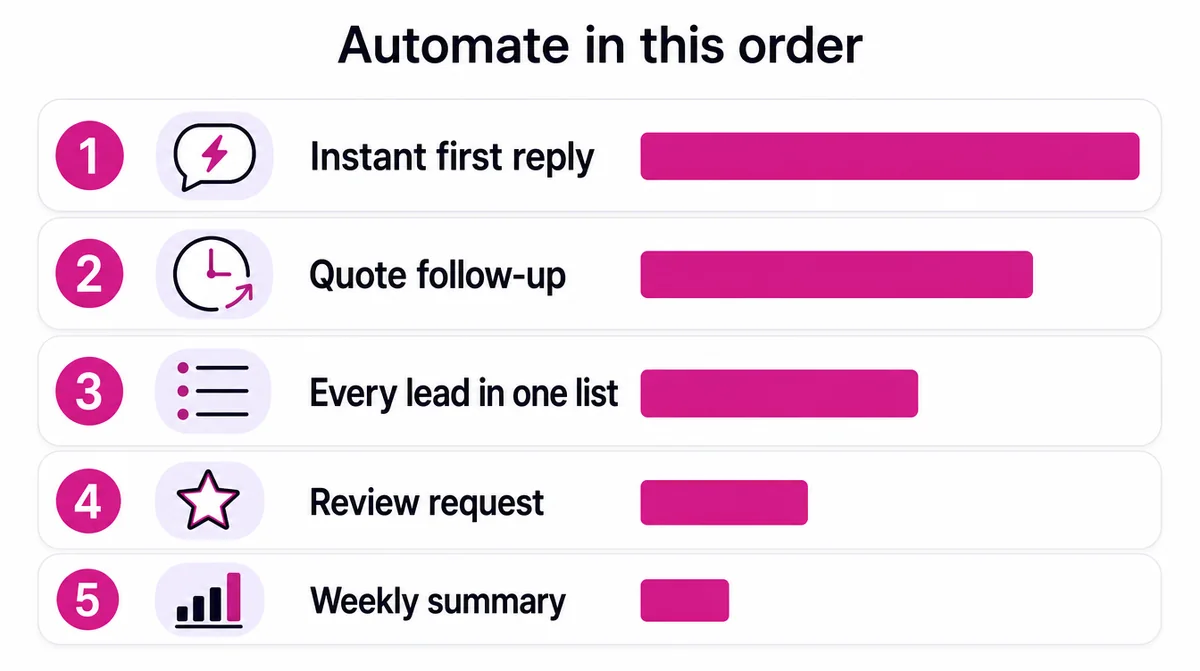
| Workflow | Starts when | What it does | What it saves |
|---|---|---|---|
| Instant first reply | A new message or form arrives | Thanks them, gives prices and hours, says when a person will answer | The customer who would have asked a competitor |
| Quote follow-up | Two days after a quote with no reply | A polite reminder, then one more a week later, stopped the moment they answer | Jobs lost to nobody chasing |
| Every lead in one list | Any enquiry, from any channel | Adds name, source, date and status to one sheet or CRM | Leads living in one person’s phone |
| Review request | A job marked done or an order delivered | Thanks them and sends the review link | Reviews you would have deserved but never asked for |
| Weekly summary | Every Monday morning | Counts enquiries, sources and what was won | The hour spent piecing it together |
The gain is not mainly the hours. It is that nothing gets dropped. If you lose one job a month to a reply that arrived too late, the automation has already paid for itself, and the busier you get the more it is worth.
Five automations every small business should set up first covers each one, in the order worth building them.
Start with one, not fiveAutomate the first reply, live with it for a month, then add the next. Five workflows built at once produce five things nobody understands well enough to fix when one breaks.
How it runs on WhatsApp, in practice
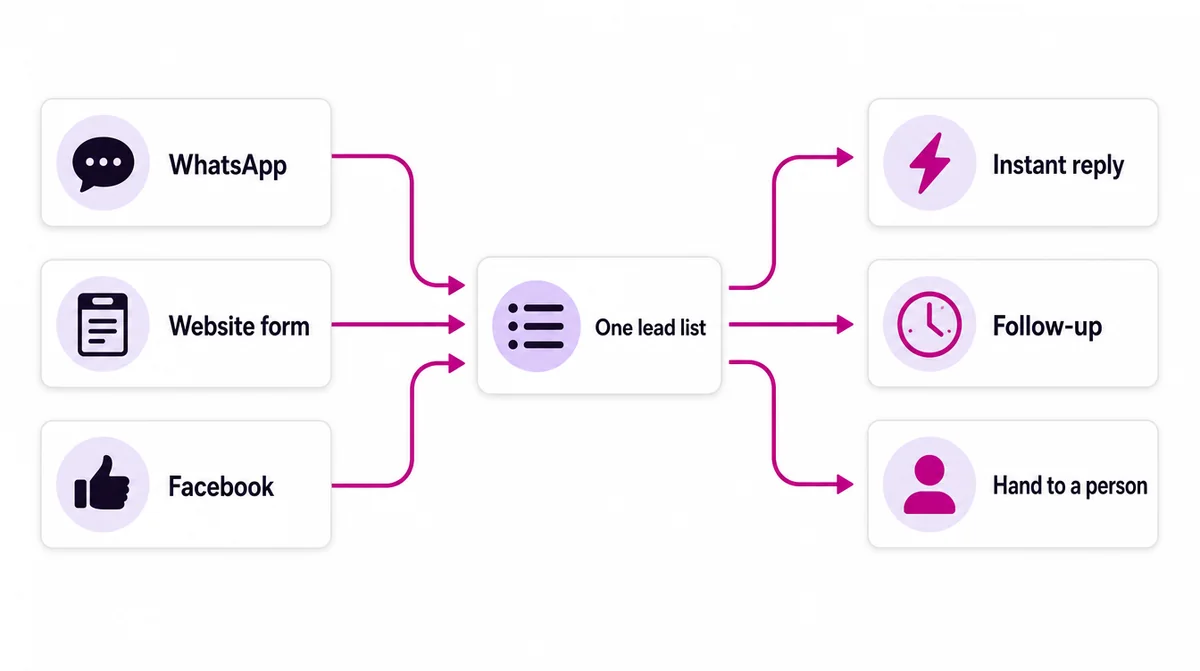
Most of what we build here runs through WhatsApp, because that is where the enquiries are. Every source feeds one list, and from there the right thing happens next.
- A greeting for first contact that says what you do and when you reply
- An away message covering evenings and Sundays, pointing at the catalogue
- Quick replies for the six questions you answer every week
- Labels separating a new enquiry from a quote sent and an order to deliver
- Every enquiry copied into one list, so nothing lives only in one person’s phone
| WhatsApp Business app | WhatsApp Business Platform | |
|---|---|---|
| Cost | Free | Paid, billed by Meta through a provider |
| Best for | Small businesses, one or two people replying | Higher volume, several people, connecting to other systems |
| Automation | Greeting, away message, quick replies, labels | Full automation, chatbots and integrations |
| Set up | An afternoon on your phone | A provider and a verified business account |
Start on the free app. Move to the platform when the volume or the number of people replying makes the app the bottleneck.
Be honest that it is automated
An automatic first reply works because it is straightforward about what it is. It acknowledges the message, says when a person will answer, and asks one useful question in the meantime. It does not need to pretend to be human and it should not try.
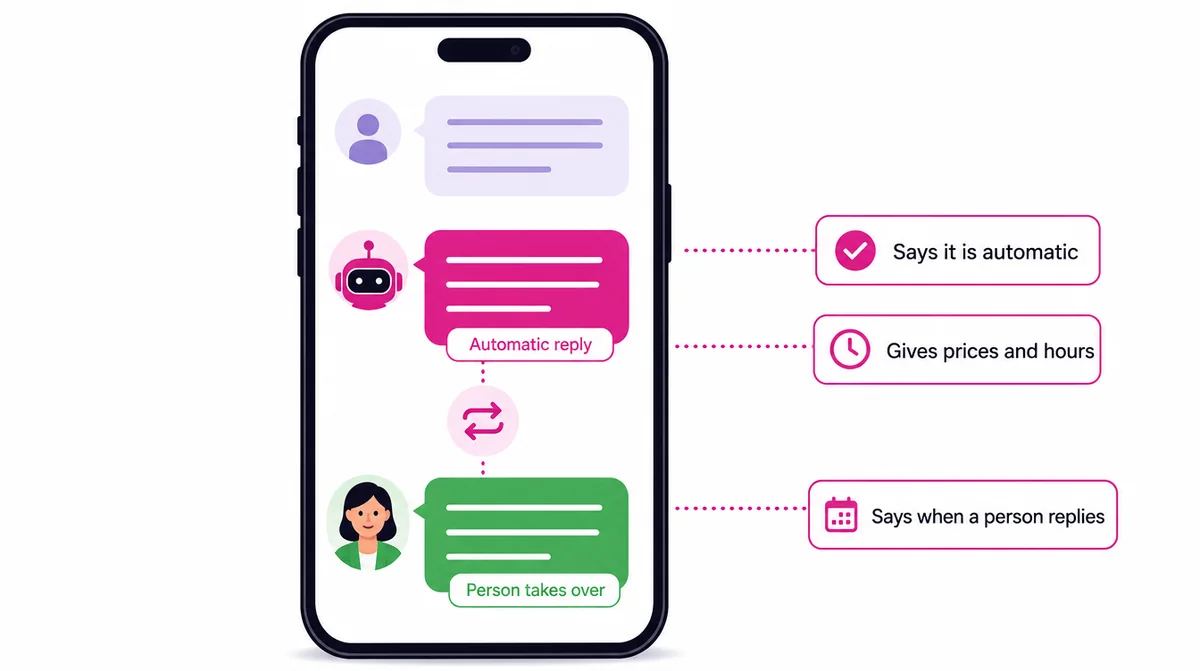
Customers notice, and the moment they do it costs you the trust the fast reply just earned. Pretending is also unnecessary: nobody minds an instant acknowledgement, and everybody minds silence.
The same applies to a chatbot. One that answers five questions well and hands over cleanly is worth more than one that improvises confidently and gets a price wrong.
Where AI writing helps, and where it hurts
It is useful for first drafts, for shortening something you already wrote, for turning notes into a structure, and for the tedious middle of a long document. It is genuinely bad at anything requiring facts only your business holds.
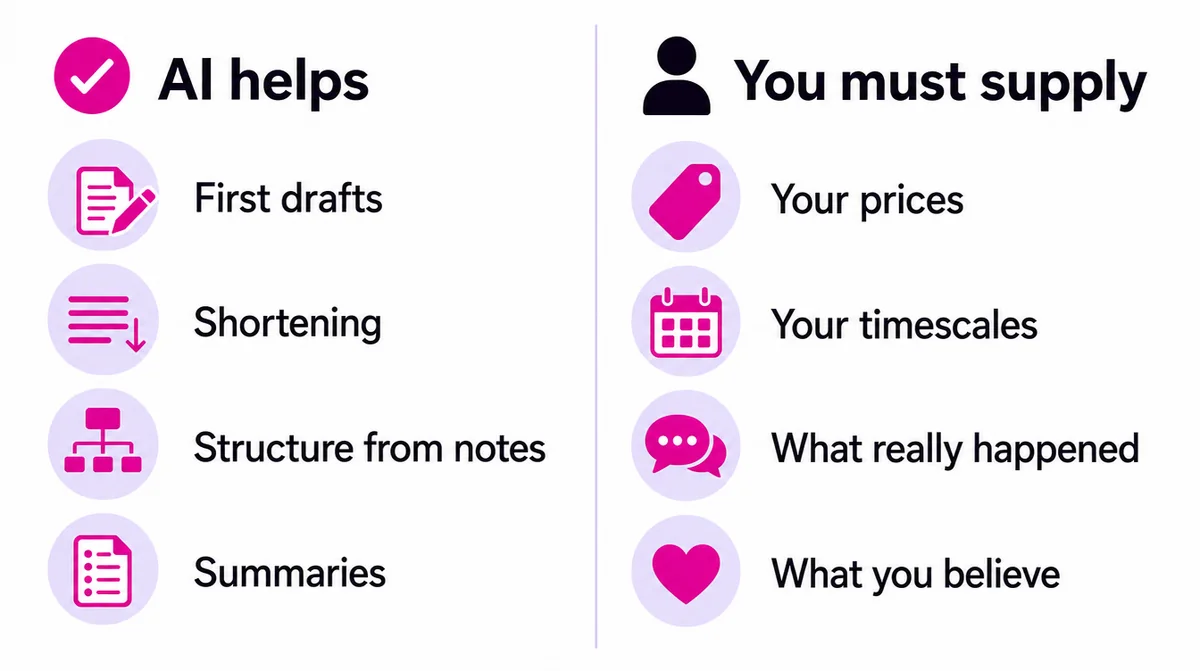
The failure is expensive because it is invisible. Text that reads fluently and says nothing specific is worse than plainer text with real detail in it, for a reader and for search alike. Google says it rewards helpful, people-first content however it is produced, and that content made mainly to manipulate rankings is spam whether a person or a machine wrote it.
- Write down the facts yourself: prices, steps, a real example, your opinion
- Let AI turn them into a first draft or a structure
- Edit it line by line, cutting anything vague or invented
- Check every number and name against your own records
- Read it aloud. If it sounds like nobody in particular wrote it, it is not finished
What AI can and cannot write for your business goes further, with examples.
Being visible to AI is becoming its own job
A growing share of buying decisions now starts with somebody asking an assistant for a recommendation rather than typing into a search box. When ChatGPT or Gemini names three businesses, being one of them is worth more than a page-two ranking.
For Google’s own AI Overviews, Google says no special optimisation is needed beyond good SEO. The other assistants draw on the wider web, and favour pages that answer a question directly and factually, that are structured clearly enough to quote a single section from, and that are corroborated somewhere else: a directory, a listing, another site mentioning you consistently. That work is generative engine optimisation, or GEO.
Almost nobody in this market is doing it yet, which is the entire opportunity.
Our GEO service explains the work, and getting your business mentioned by ChatGPT and Gemini covers what you can change yourself.
Choosing tools you can leave
Most of the value comes from connecting things you already run: WhatsApp, your website forms, email, and a spreadsheet or CRM. So the question is less which tool is cleverest and more which one you could leave.
| Kind of tool | What it does | What to check |
|---|---|---|
| Messaging | WhatsApp Business app or platform, email | Who owns the number and the account |
| Workflow connector | Moves information between tools when something happens | Whether it can be self-hosted, and how pricing grows |
| Lead list or CRM | Holds every enquiry and its status | That you can export everything, any time |
| AI assistant | Drafts replies, summaries and content | What happens to the data you paste into it |
- Can you export everything, in a usable format, without asking permission?
- Is pricing per user, per contact or per action, and what happens as you grow?
- Where is the data held, and who else can read it?
- If the tool disappeared tomorrow, what would you have to rebuild?
We favour tools that can be self-hosted where it is practical, so the workflows and the data passing through them stay with the business rather than with a subscription that reprices every January. The tools we actually use are listed, with costs, on tools we use.
Consent, privacy and staying on the right side of WhatsApp
Automation makes it easy to message a lot of people, which is exactly why it needs rules. WhatsApp’s business messaging policy says you may only contact people who have given you permission to do so. Messaging people who did not ask gets your number reported and restricted, and that is very hard to undo.
- Only message people who contacted you first or clearly agreed to hear from you
- Make it easy to stop: honour “stop” immediately and permanently
- Do not paste customers’ personal details into AI tools you do not control
- Say on your website what your forms collect and what you do with it
- Keep the lead list somewhere only the right people can open
Our own approach is in our privacy policy, written in plain language.
Where automation goes wrong
The failures are consistent and worth knowing before you start.
| What goes wrong | Why | How to avoid it |
|---|---|---|
| A broken process runs faster | It was automated before anyone settled the rule | Do it by hand until the rule is clear |
| Nobody can fix it | Five workflows were built at once | Add one a month and document each |
| One person holds the keys | Everything lives in a tool only they understand | Share access and write down how it works |
| Customers feel chased | Follow-ups read like a debt collector | Write messages as you would yourself, and stop on reply |
| It stops silently | A form field or number changed | Send yourself a test enquiry every month |
Check it monthly, brieflyAutomations fail silently. Send yourself a test enquiry once a month and watch it travel through, from the first reply to the lead list.
What it looks like in different businesses
The same five automations look different depending on what you sell. These are typical first builds for businesses we work with here.
| Business | First automation | Second | What it saves |
|---|---|---|---|
| Salon or barber | Booking confirmation and a reminder the day before | Review request after the appointment | No-shows and empty chairs |
| Clinic | Appointment reminders with directions | A follow-up message after the visit | Missed appointments and phone time |
| Shop selling on WhatsApp | Instant reply with the catalogue link | Order status messages | Repeated price and stock questions |
| Hotel or guesthouse | Instant reply with rates and availability link | Pre-arrival message with directions | Lost bookings to faster competitors |
| Services to businesses | Quote follow-up after two days | Weekly summary of enquiries | Quotes that went quiet |
Each of those is described for its sector on our industry pages, for example hotels and hospitality and healthcare and clinics.
How we run our own agency on it
We do not just recommend this; it is how Digital Krypton itself works. The agency is run by one founder with a set of AI agents built on Hermes, each with a narrow job: research, writing, design, campaign monitoring, workflow building and reporting.
The rule that makes it work is simple: nothing an agent produces reaches a client until a person has reviewed it. The agents take the hours out of the repetitive work; the person keeps the judgement, the relationships and the responsibility. It is the same balance we would recommend for any small business adopting automation.
The full picture, agent by agent, is on our team page.
A 30-day automation starter plan
| Week | Do this | Done when |
|---|---|---|
| Week 1 | Set up WhatsApp Business properly: greeting, away message, quick replies, labels, catalogue | A test message gets an instant, honest reply |
| Week 2 | Put every enquiry from every channel into one shared list | Nothing lives only in one person’s phone |
| Week 3 | Write and start a quote follow-up: two polite messages, stopped on reply | Every quote is followed up on schedule |
| Week 4 | Add the review request after each job, and a Monday summary | Reviews arrive weekly and you see the numbers without searching |
Do it by hand first where the table says so. Once each step has run reliably for a few weeks, it is ready to be automated properly.
What it costs, and how to tell it is working
Most of what a small business needs costs far less than expected, because it connects existing tools rather than buying new ones. The WhatsApp Business app is free, and so are the starter tiers of many workflow and CRM tools. The expense arrives when somebody sells a platform where a workflow would have done.
| Measure | Before | What good looks like |
|---|---|---|
| Time to first reply | Hours, or the next day | Seconds, any time of day |
| Quotes followed up | When somebody remembers | Every one, on schedule |
| Leads recorded | Scattered across phones | All of them, in one list |
| Reviews per month | Whatever arrives unasked | A steady flow after every job |
It stops being worth it when the process you are automating is not settled yet. Automating a broken sequence gives you a broken sequence that runs faster and is harder to change.
Our automation plans start at 150,000 FCFA for setup, with optional monthly care from 25,000 FCFA, and the tool costs are yours and shown separately. See the AI automation pricing, what we automate for businesses in Cameroon, or start with the free audit.
Where this comes from
The primary sources behind the claims above. Each one is worth reading in full if you want the detail.



If you would rather not do it yourself
See our automation service
If you would rather somebody built and maintained the workflows, we choose the tools, connect what you already run, and keep it working.
Questions
The things people ask first.
AI marketing automation uses software to handle the marketing tasks that repeat: replying to enquiries, following up on quotes, collecting every lead in one place, and sending reports. For a small business it usually means every enquiry answered in seconds, on whichever channel it arrives, and every lead landing in one list, whether or not anyone is at the desk.
The instant first reply to a new enquiry. It is the cheapest to build, the hardest to do reliably by hand, and the one where failure costs you a customer who simply went elsewhere while waiting.
They should. A good automatic reply says what it is, tells the person when somebody will answer, and asks one useful question meanwhile. Pretending to be human costs you the trust the fast reply just bought.
Start with the free app: greeting and away messages, quick replies, labels and a catalogue cover most small businesses. Move to the Business Platform through a provider when message volume or the number of people replying makes the app the bottleneck.
Only those who have given you permission. WhatsApp's business messaging policy requires opt-in, and messaging people who did not ask gets your number reported and restricted. Make stopping easy and honour it immediately.
Usually less than you expect. Most of the value comes from connecting what you already run: WhatsApp, website forms, email and a spreadsheet or CRM. We prefer tools that can be self-hosted so your data stays yours.
It can draft. It cannot supply the specifics that make content worth reading or worth ranking: your prices, your timescales, what actually happened on a job. Google rewards helpful content however it is made, and text that says nothing specific is not helpful.
Often the opposite. The smaller the team, the more it matters, because there is nobody else to catch what falls while you are doing the actual work.
Next step
Tell us the goal. We will come back with the plan.
No pressure and no obligation. Start with the free audit, or send us a brief and get scope, timeline and cost in writing.
